Release notes
Two new elements, many enhancements, and an API for analytics.
24 February, 2026
Skylar Aieta
Product Designer
Over the past few months, we’ve been quietly releasing a series of small updates one after the other in a rapid-fire iterative approach to product releases from Standards 13.2 to 13.7. Now that we’ve finished this batch of improvements to the app, we’re excited to go over everything that’s been added since the beginning of the year. Let’s dive in.
New elements
Video player
Despite already supporting video files since our beginning with the use of Media and Embed elements, we’ve only now released a native Video element. This is an all new element designed exclusively to display video media, with additional features unique to the format such as an included play button and timeline controls.
For more information regarding video players, see our guide.
Toggle
Another new element we’re excited to announce is a Toggle. Similar to our existing Sequence element, Toggle elements are designed intentionally for displaying a binary relationship between content. These are especially helpful for demonstrating brand assets in different color modes, hiding or showing guide illustrations, or bringing some interactivity to your do’s and don’ts section.
For more information regarding toggle elements, see our guide.
More new features
Updates to Menu
We’ve made a number of enhancements to Menus. Most notably, we’ve added a new Logo element designed to support your brand’s logo alongside the Controls in both the Open and Closed states. This element is hidden by default but can be activated from the sidebar. Additionally, we’ve added an all-new behavior, allowing Menus to hide on scroll for a more refined viewing experience.
For more information, see our guide.
Responsive behaviors
Our contextual behavior settings have been refactored to allow for unique interactive behavior functionality set for each breakpoint. Previously, element behavior were set universally for all breakpoints. Now, responsive control for behaviors allows for new ways of crafting intentional interactive experiences for any device.

Custom aspect ratios
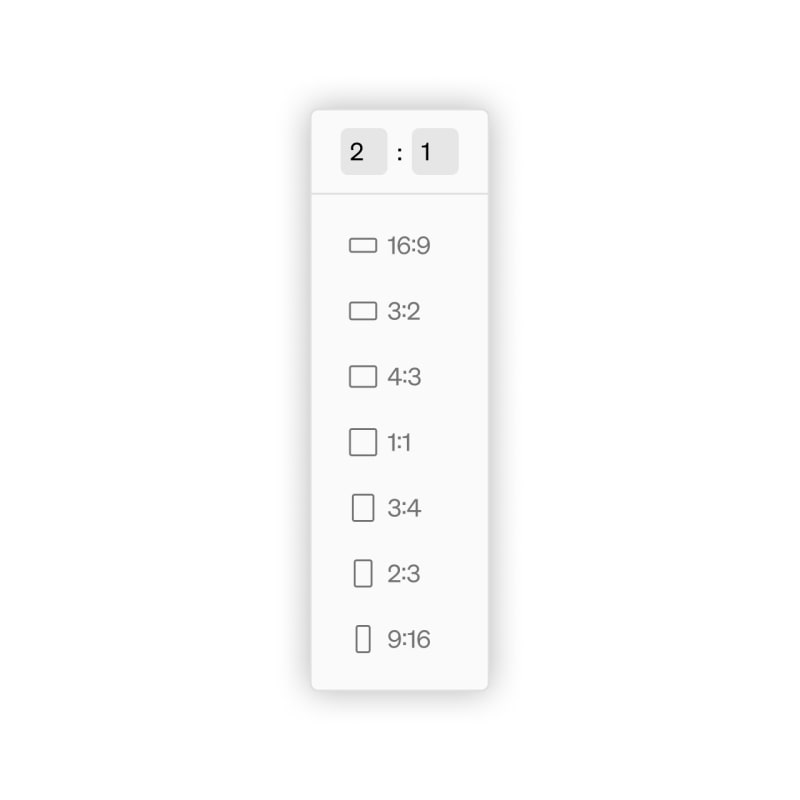
In addition to our familiar set of standardized aspect ratios, we’ve added the ability to set custom aspect ratios for any element that allows aspect ratio sizing. Additionally, we’ve added the ability to use aspect ratio sizing for Button elements. This new flexibility with aspect sizing allows for improved support for asymmetrically tiled or “bento” layouts.
New effects
Finally, we’ve added a new backdrop filter effect that includes support for a variety of new filters such as blur, brightness, contrast, etc. These new backdrop filters are especially useful when applied to Menus, Buttons, or other elements designed for layered contexts.
For more information, see our guide.
Standards Analytics API
Enterprise
Custom Scripts
For customers with Enterprise subscriptions, we now offer the ability to inject custom scripts into the header and footer tags of your standards site. This allows you to add third-party tools like analytics platforms, chatbots, and tracking pixels to your published project.
For more information regarding custom scripts, see our guide.

Enterprise
Analytics API
The Standards Analytics API is a JavaScript API available on all projects published with an enterprise subscription. It lets your custom scripts listen to visitor interactions like page views, downloads, and more.
For more information regarding the Analytics API, see our guide.

More enhancements
-
Added hotkeys for editor modes (1,2,3)
-
Added position setting for Copy & Share confirmation message
-
Added media and video custom thumbnails to content mode
-
Added effects to the play button and playhead elements
-
Added outside spacing to menu controls in closed state
-
Added ‘auto-hide controls’ setting on video player element
-
Added ‘description’ setting for buttons, which allows customization of ‘aria-label’ attribute
-
Added ‘description’ setting for video elements, which allows customization of the ‘title’ attribute
-
Added page and section auto-focus when navigating
-
Autofocuses dropdown contents when opening
Get in touch
If you have any feedback, questions about this update, or have ideas for what we should work on next, please let us know by emailing [email protected]